See the day laid out, log the next thing in one tap, or skip a slot.
Free2 steps
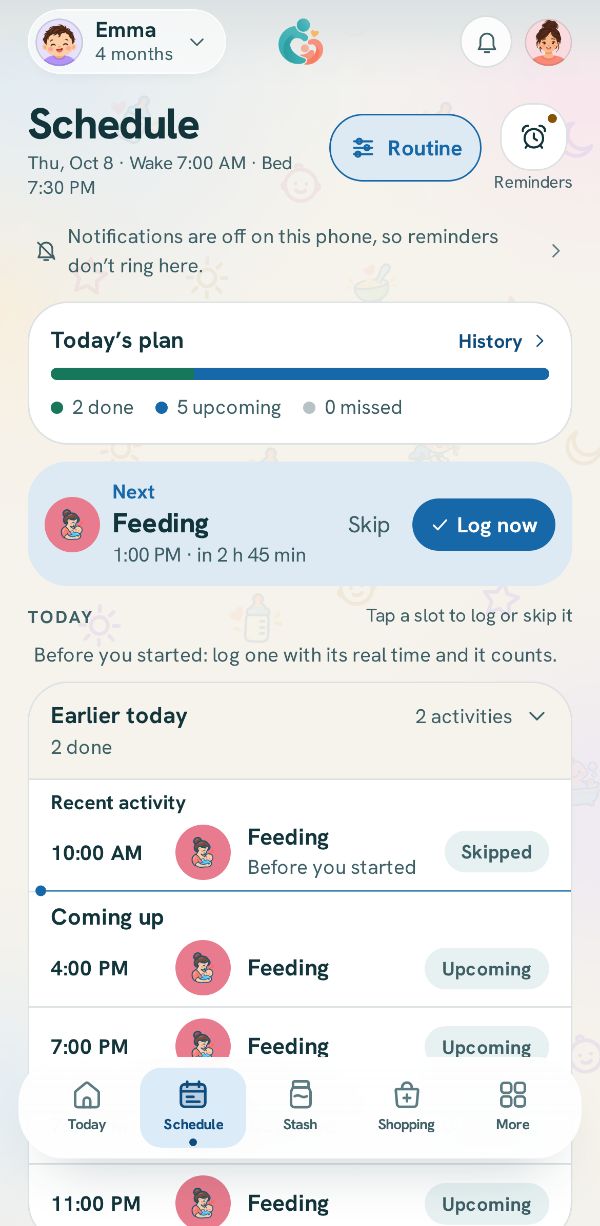
The Schedule tab is your routine laid out over today: what is done, what is next, and what is coming.
1
Today's plan and Next
Today's plan counts what is done, upcoming and not logged. The card under it is what is Next, with its time and how long until it.
Tap Log now to open its sheet, ready for that slot, or Skip if it is not happening.
2
Any slot in the day
Further down, every slot of the day is listed. Tap one to log it or skip it. Logging from a tile on Today counts for the slot too, so you never log twice.